


⏱️ TL;DR & The Hook
Tested in March 2026
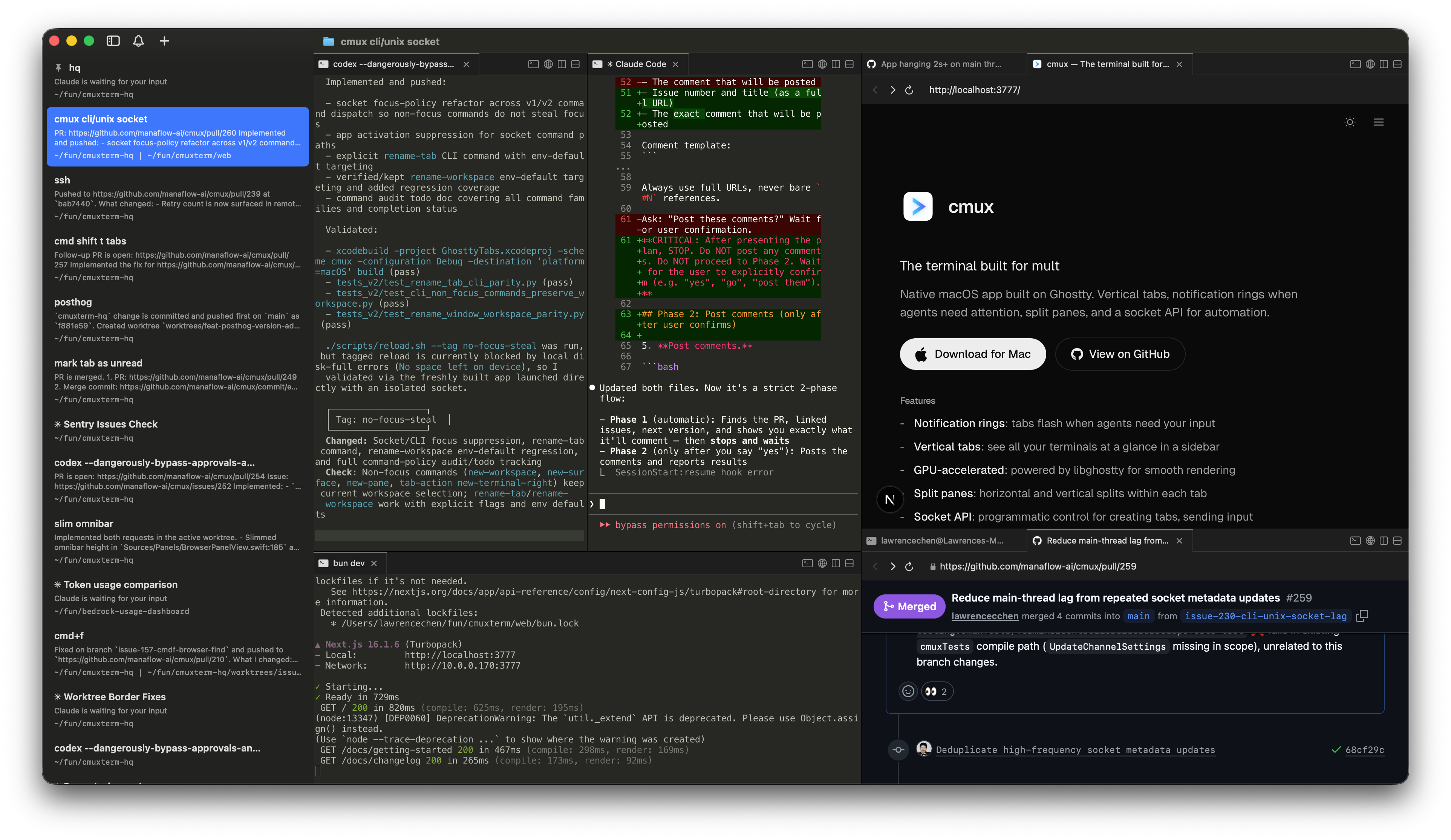
Quick Verdict: cmux is a free, native macOS terminal built specifically for "vibe coding" and managing multiple autonomous AI agents like Claude Code, Aider, and Goose. By combining the blazing-fast Ghostty rendering engine with native GUI split panes and visual notification rings, it lets you orchestrate parallel AI workflows without drowning in terminal tabs. If you're treating AI agents like a team of developers, cmux is your command center.
The Hook: Stop memorizing tmux prefix keys to check on your AI agents—cmux gives you a visual mission control for the vibe coding era.
🚨 The Problem It Solves
Problem: You are embracing "vibe coding" —orchestrating multiple CLI-based AI agents (like Claude Code, Aider, or Goose) simultaneously. But tracking which agent is working, which is stuck on an error, and which is waiting for your approval across 10 different terminal tabs is a chaotic nightmare.
Agitation: Traditional terminal multiplexers like tmux or Zellij require learning complex keybindings (the dreaded Ctrl+B) and lack native visual alerts. Modern IDE terminals (like Cursor's) are too cramped for running 4-5 autonomous agents in parallel. You end up context-switching constantly just to see if an AI is done thinking.
Solution: cmux solves this by providing a native macOS terminal GUI designed for multitasking. It uses visual notification rings, sidebar badges, and OS-level popovers that automatically alert you the exact moment an AI agent needs your attention, letting you manage a fleet of agents effortlessly.
📝 Tool Overview
At its core, cmux (by manaflow-ai) is a native Swift and AppKit macOS terminal app that uses the highly-regarded libghostty for blazing-fast terminal rendering. Instead of being a fork of Ghostty, it is a completely different application built on top of its engine, adding vertical tabs, split panes, an embedded browser, and a socket API directly into the GUI.
It acts as the ultimate orchestrator for the modern AI workflow, where your job is no longer just writing code, but managing the agents that write the code for you.
📺 See It In Action
Watch cmux in action with Claude Code. This 6-minute demo by Better Stack shows how visual notifications and split panes work when orchestrating multiple AI agents simultaneously.
Source: Better Stack — 45K views, 6 min 18 sec
💡 Key Features & Use Cases
- Visual Notification Rings & Badges: When a process (like Claude Code) needs attention or asks for command approval, cmux automatically highlights the pane with rings and shows unread badges in the sidebar.
Workflow fit: Never miss an agent blocked on a simple [Y/n] prompt again. - Ghostty Rendering Engine: Powered by
libghostty, ensuring GPU-accelerated, zero-latency text rendering capable of smoothly processing thousands of lines per second at 120fps+.
Workflow fit: Handles massive streams of code output from fast LLMs without lagging your machine—even when running 4-5 autonomous agents simultaneously without memory leaks. - Native macOS GUI Multiplexing: Vertical tabs, split panes, and an embedded browser—all accessible without config files.
Workflow fit: Easily split your view between your local server, Aider, and an API reference browser all in one window. - Universal Agent Support: Works out-of-the-box with Claude Code, Codex, Gemini CLI, Aider, Goose, Cline, and any CLI tool.
Workflow fit: Mix and match the best AI models for different tasks in the same environment.
🥊 Vs. Alternatives
- cmux vs. iTerm2: iTerm2 is the undisputed heavyweight of macOS terminals, packed with endless customization. However, when you're running 4-5 autonomous AI agents across split panes, iTerm2 quickly becomes visually noisy. cmux is purpose-built for this new "vibe coding" era—it uses visual notification rings and sidebar badges to actively tell you exactly when a specific agent is blocked and needs your approval, acting as a true AI command center rather than just a text emulator.
- cmux vs. Tmux / Zellij: tmux and Zellij run inside your terminal and require keyboard-heavy TUI navigation. cmux replaces them entirely with a native macOS GUI (AppKit), meaning you get proper mouse support, visual tabs, and OS-level notifications without the steep learning curve.
- cmux vs. Cursor: Cursor is a full IDE where the AI edits your files directly. cmux is a pure terminal. If you prefer the "vibe coding" style of running autonomous CLI agents (like Claude Code or Goose) rather than relying solely on Cursor's Composer, cmux is the better environment.
- cmux vs. Warp: Warp is a fantastic, modern terminal with AI chat built-in. However, Warp is designed around blocks and single-pane workflows. cmux is explicitly built for heavy multiplexing and tracking parallel background processes natively.
⚖️ Pros, Cons & Pricing
👍 Pros
- Perfectly tailored for "vibe coding" with multiple AI agents.
- Native visual notifications when agents are blocked.
- Zero-config split panes and GUI workspaces.
- Blazing fast rendering via
libghostty.
👎 Cons
- macOS only (no Windows or Linux support currently).
- Requires shifting your workflow to CLI-based AI agents.
- Currently in early active development.
Pricing: cmux is completely free to use, and the source code is available on GitHub.
❓ FAQ
- Is cmux free to use?
- Yes, cmux is entirely free and open-source, available on GitHub.
- Does cmux work on Windows or Linux?
- No, cmux is currently a macOS-only native application built with Swift and AppKit.
- Is cmux just a fork of Ghostty?
- No. cmux uses Ghostty's rendering engine (
libghostty) as a backend library, but it is a distinct application with a completely different UI and feature set built around multitasking. - Does cmux support custom keyboard shortcuts?
- Yes. Standard terminal keybindings are read from your Ghostty config, while cmux-specific shortcuts (splits, workspaces) can be customized natively in the macOS Settings.
🧠 Final Verdict
"As a design leader and builder orchestrating multiple AI agents daily, cmux is the first terminal that successfully bridges the gap between raw CLI power and visual UI affordances. It reduces the operational drag of vibe coding to zero."
— Subin Park, Principal Designer
If you are riding the "vibe coding" wave and orchestrating multiple AI agents via the command line, cmux is an absolute game-changer. It takes the pain out of terminal multiplexing and replaces it with a beautiful, macOS-native UI that actively tells you when your AI needs help. If you're on a Mac and use tools like Claude Code or Aider daily, you should download it immediately.
