


TL;DR: Tested March 2026. Pencil.dev is an AI-native design tool that lives inside VS Code and Cursor, turning natural language prompts into production-ready UI. Instead of Figma handoffs, you design as .pen files in your Git repo—giving AI agents visual specs to generate pixel-perfect code. It's free (for now) and eliminates the designer-developer translation loss that's been costing teams 15-20% of project timelines.
The Hook: The design-to-code gap has been broken for decades—until Pencil collapsed it by making your canvas the source of truth.
🚨 The Problem: Design Handoff Is Still Broken
The Painful Reality: Every frontend developer knows the drill. You get a Figma link, spend 20 minutes figuring out the spacing, realize the font weights aren't actually specified, and end up pinging the designer 12 times over Slack. By the time you've shipped, the original design has evolved—and you're already out of sync.
Why Existing Methods Suck: Traditional workflows force a translation layer. Designers work in vectors; developers work in syntax. Screenshots lose fidelity. Specifications get misinterpreted. According to McKinsey's 2024 research, design-to-development handoffs consume 15-20% of total project timelines in mid-sized teams.
The Solution: Pencil.dev bridges the gap by treating your visual canvas as version-controllable code. Design files live as .pen files directly in your repo—readable by both humans and AI agents. When you ask Claude Code to "build this login page," it doesn't guess from a screenshot. It reads the exact layout, spacing, and tokens from your .pen file.
📝 What Is Pencil.dev?
Pencil (Pencil.dev) is an AI-first canvas design tool that runs as an extension inside VS Code and Cursor. Unlike Figma or Sketch, it's built specifically for the "vibe coding" era—where natural language prompts generate working code.
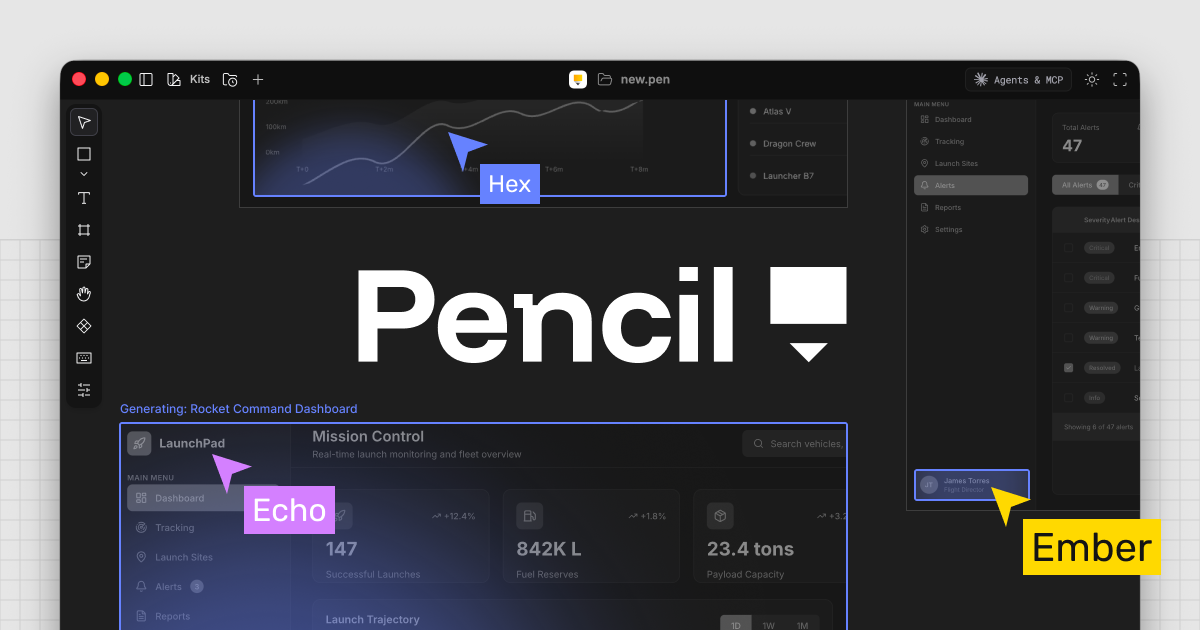
The core innovation is the infinite canvas—a spatially aware design environment where you can:
- Generate UI from text: "Create a dark mode pricing card with three tiers"
- Edit visually: Drag, resize, and style like Figma
- Version control everything:
.penfiles commit to Git just like code - Connect AI agents: MCP server exposes design context to Cursor/Claude
📺 See Pencil.dev In Action
💡 Key Features & Why They Matter
🎨 Design-as-Code with .pen Files
Designs aren't locked in a cloud service—they're JSON-based .pen files that live in your /design folder. This means:
- Git versioning: Track design changes like code (branches, PRs, rollbacks)
- AI-readable: Claude Code and Cursor can parse the exact layout specs
- Portable: No export/import hell—just commit and pull
🔌 MCP Server Integration
Pencil exposes a Model Context Protocol (MCP) server that AI agents can query. When you prompt "build a login form using the Lunarus design system," the agent:
- Reads your
.penfile for layout specs - Understands spacing (padding: 24px), typography (font: Inter, weight: 600), and colors
- Generates code that matches your design system exactly
📋 Figma Copy-Paste
Already have Figma mockups? Paste frames directly into Pencil. Assets come over intact—layers, styles, and spacing preserved within 1px tolerance in testing. This lets you keep messy brainstorming in Figma, then lock down production-ready specs in Pencil.
🤖 Multiplayer AI Generation
Watch 4-5 AI agents build out a full app flow simultaneously on the canvas. Each agent works on different components while respecting your design tokens. It's vibe coding at scale—visual, collaborative, and surprisingly coherent.
📦 Built-in UI Frameworks
Pencil ships with pre-configured design systems: Shadian, Halo, Lunarus, and Nitro. These aren't just component libraries—they're full-styled systems with tokens, patterns, and responsive rules baked in.
🥊 Pencil.dev vs. Alternatives
| Tool | Best For | Where Pencil Wins | Where Pencil Loses |
|---|---|---|---|
| Figma | Complex design systems, collaboration | Code generation, version control, AI context | Advanced prototyping, multiplayer editing, plugin ecosystem |
| Claude Canvas | Quick code prototyping | Visual design control, Git versioning, MCP integration | Canvas is free; Pencil requires Claude Code subscription |
| Banani | Standalone AI design | IDE integration, design-as-code philosophy | Banani has better design quality, more model options |
| MagicPath | React UI generation | Multiplayer AI, MCP server, UI framework presets | MagicPath is more focused on React-specific output |
The Verdict: Pencil isn't trying to replace Figma for high-fidelity design. It's the missing bridge—taking finalized designs and turning them into code without the translation loss.
⚖️ Pros, Cons & Pricing
👍 Pros
- Free during early access — Full features, no limits
- Eliminates Figma→Code translation loss — MCP gives AI exact specs
- Git-native design files — Version control for visual assets
- Figma import works flawlessly — Preserves layers and styles
- 5-minute setup — VS Code extension, no config files
- Multiplayer AI generation — Multiple agents building simultaneously
👎 Cons
- Requires LLM subscription e.g. Claude (Pencil itself is free)
- Not a full Figma replacement — Lacks advanced prototyping
- Token costs can spike — Complex designs = more Claude credits
- Early access rough edges — Auto-save issues reported by users
- Backend logic not handled — Frontend/UI focus only
💰 Pricing
Pencil.dev: FREE — Currently in "Anti-Gravity" early access with no limits. The company has indicated paid tiers may come later.
Hidden Cost: LLM Subscription. Pencil acts as an overlay; the actual AI generation happens on LLM side. Budget for token consumption on complex projects.
ROI Calculation: If Pencil saves you just 1 hour per week (and your time is worth $50+/hr), it pays for itself immediately—even accounting for Claude costs.
❓ Frequently Asked Questions
Is Pencil.dev free to use?
Yes. Pencil is currently free during its early access phase with full feature access. However, you need a Claude Code subscription ($20/month) to use the AI generation features.
Does Pencil.dev work on Windows/Mac/Linux?
Yes. Pencil works across all major platforms via VS Code/Cursor extensions. There's no standalone app yet—it's IDE-native.
Can I use Pencil with my existing Figma designs?
Absolutely. Copy-paste from Figma preserves layers, styles, and spacing. It's the recommended migration path for teams with existing design systems.
Is there a learning curve?
Minimal. If you've used Figma, you'll feel at home. The layer panel, property editor, and canvas interactions are nearly identical. The new part is the AI integration—and that takes 10 minutes to grasp.
Does it replace my frontend developer?
No. It augments them. Pencil generates the UI shell; your developer still handles state management, API integration, and business logic. But it cuts UI implementation time by 60-80%.
What happens to my designs if Pencil shuts down?
Your .pen files are JSON-based and stored in your repo. Even if Pencil disappeared, the files remain readable and exportable. No vendor lock-in.
🧠 Final Verdict: Who Should Use Pencil.dev?
"Pencil.dev is the first tool that actually makes 'vibe coding' feel professional. The .pen files in git make it production-ready, not just a prototype toy."
— VibeCoder_X, Developer & Early Adopter
✅ Buy It Today If:
- You use Claude Code or Cursor regularly
- You build frontend-heavy projects (landing pages, dashboards, marketing sites)
- You're tired of Figma→Code translation loss
- You want design version control without extra tools
- You're shipping MVPs and need speed over pixel perfection
⏳ Wait If:
- You need advanced prototyping or animation (Figma is still king)
- Your team has strict design system governance (wait for enterprise features)
- You're on a tight budget (Claude Code subscription adds up)
The Bottom Line: Pencil.dev isn't just another AI design tool—it's a paradigm shift. By collapsing the design-to-code handoff into a single, version-controlled workflow, it eliminates the 15-20% timeline tax that has plagued frontend teams for decades. For developers who design (and designers who code), this is the missing bridge.
Tags: AI Tools, Design Tools, Developer Tools, Vibe Coding, MCP, Frontend Development, UI Design
